This has been an insane project for me. I have learnt so much about design and coding. I have become a lot more confident in my abilities to do various tasks, like modelling and coding.
Has it been overwhelming at times? Yes, but I persevered. There has been so many challenges, and so many changes to the project overall. I had to get rid of a lot of code cause of it, which is not a bad thing as it is extra experience for me. In the end, the project became something I had hoped for from the beginning. An actual playable game.
Personally, everyone on the team contributed significantly in the areas they were assigned. They did the work to their upmost ability, and the work they did create were amazing. I am really proud of the team.
Overall, this project was a challenge as to whether we were up to the task of creating such an intricate game, and to me, we have succeeded.
Here is everyone’s blog who has contributed in this project. Everyone has done a great job in this project. I shall fill it out when all the links are available.
LEADER WOLF GEORG NIBELUNG FREIHERR VON UN ZU WEILER
This is the team leader! Out here organising and making sure everyone is doing their part. Mad stuff!
One of the 3D artists, particle effects and lighting designer. Made so many models and created all the particle effects for skills and lighting effects. Spectacular work!
The other 3D artist and the 3D animator. Made so many assets for the environment and created every animation for the characters in the game. Superb outcome!
The version history of the project. There has been a lot of changes made by many people. I am definitely not going to go through every change that has been made. Also, the way it has been uploaded, they are probably not in order, so enjoy!
A very short script this one is. Very short indeed.
Just gonna be turning the game objects off and on, easy stuff.
In the update function, if the escape key is pressed, it will turn the cursor visible, the quit menu will be active and the normal menu will be in active, simple stuff.
This week started off with a banger! Had a real good meeting, and got stuff working, like limiting the health and ensuring the skills do not stack with one another. This is good.
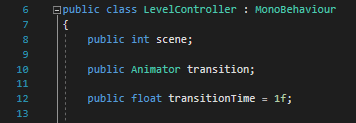
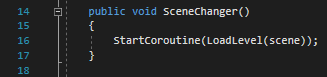
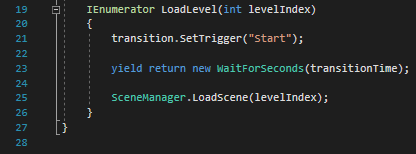
Now, all the scenes transition into one another, with a transition animation, which is just a fade to black. Everything is nearly done, woo!
All transitions have been enabled in all the scenes. I have created the asset dump and character showcase scenes. I am tired. Everything is connected to one another and the menu has been implemented, all parts included.
I have now included all the music, and it really does bring the game to life. There were also some balancing changes I have made so that it is a bit more fast paced and that the players have a really good advantage.
I have buffed every skill, increasing all of their ranges. I also did some changes to the environment, so that the player cannot go through the assets. Simple changes. I also added a skip level button for the levels and the cutscenes.
Look at that, made more showcase stuff. Also added more audio and feedback changes. I am so close to finishing this project, I could literally taste it. Tastes like sand tho…
I have made so many little changes, so that it does not break the game… It is tiring…
Made a lot of last minute changes, like adding controls, and explanation of how the stats and status effects work. This is intense.
Now I have removed the whole mouse movement thing from the battles. Easy thing.
First thing is getting them variables. We have the player and enemy game objects, as well as many other things. It also has materials and counters and a line renderer. Many things this script does…
The awake function. This is called before the start function. Here, we get the game objects of the enemies, set the attack and skill panels off and get the line renderer.
In the start function, it calls the function, draw range indication. That is it.
Here is the way to change characters. As the player presses e or q, it changes the counter, which then changes the player. It either increases the counter or decreases it depending on what button you press.
So, the actual change player function. This will turn the active player to the player count, as well as call the player selection function. It will also move the camera to the active player and draw the range indicator.
It will also change the images of the player skills and guns, depending on the character.
So, the player selection function. It turns on the movement script for that character and applies the active material. It will then get all the other player characters, and turn their movement active function off.
It will then check if the other characters have a decision. If they do not, then it will apply the inactive material.
This is the function that calls skills. It just activates the skill depending on which button you press, and is different for each character. Very nice bit here.
Same as the one above, except for guns. Just applies the guns stats onto the player character that is active, and voila.
This function then calls the passives for every character on the scene, as well as checking whether they have a status effect. Easy stuff.
This function applies the status effect on the characters, if they have status effects to apply.
This function calls for the skills for every enemy. As the boss and mini boss has slightly different functions, it calls them from their respective scripts.
Same as above, but this time is for guns. Only the boss has a specific function for the guns, so it calls it from its script.
As the player and enemies apply skills, they need to be reset every round, so that they do not become super defence every turn. This helps with that.
The death function. Everyone dies eventually, just at different times and different circumstances.
This function checks whether the characters are dead, both players and enemies. If so, it turns off their mesh renderer, activates their gravestone and disables their player stats script.
This little function increases the turn counter. Very nice.
This thicc boi controls what the player can do each phase. So, in the first phase, the movement is enabled, shooting disabled and the attack panel is inactive.
The next phase, the movement is inactive, and the skill panel is active.
The third and final phase, the movement is disabled, shooting enabled, skill panel inactive and the gun panel is active. It then repeats it every turn.
This function is the PERFORM ALL ATTACKS. Everyone deals them damage, either applying or just wildly shooting. The mini boss and boss has different functions for attacking, like before, and the boss also has an extra function to check whether it will lose body parts or not.
It will then change the end turn button to the movement button.
This only changes the end turn button to attacking. Very lonely little function…
This function moves every character on the field. Everyone be shuffling. They are called from the respective scripts.
It also changes the end turn button to the skill sprite.
This is where the actual chonk of the management is. Here you can see what happens in every phase. So, in the first phase, the characters move, the effects are applies, the passives are applied, it checks if anyone has died and resets the stats.
Second phase is similar, except for applying the skills for both players and enemies.
The third phase is also similar, except for applying the enemy guns and performing the attacks.
It will then call the increase turn counter function, to indicate which phase they are on. It will also call the manage phase function, to check what the player can do. Finally it calls the draw range indicator.
This function calls the get active ring function. It then draws the indicator, using a ring and line renderer. It also set the position of the rings centre.
This is function is how the ring is going to be drawn and for whom. It draws the indicator as a circle.
Next it checks what phase of battle it is on. So, the first phase, it will draw the speed range. Second range it will draw nothing. On the third phase, it will draw the ranges for the guns.
It also only draws for the active player, and no one else.
The next part is how the ring is drawn, using cosine and sine stuff… I actually do not know how this works… help…
It then keeps changing depending on which character is active… I think…
So, second longest script. Woo… All of the different powers that is in the game. Nice… Enjoy…
First skill, quick fire. It doubles the amount of shots the player can shoot. Some of that nice extra damage.
Another simple skill. It just increases the accuracy to 100, so the player never misses its next shot.
This skill applies a poison affect on to nearby enemies, and applies it for 5 phases. It has a really big range, so these enemies gonna feel the buzz.
This dude out here spitting. Straight up like decreases these enemies speed ting. Like woah.
Um.. So this effects enemies which are quite close to this specific player, reducing the speed by 50%
This is a really good support skill, helping all allies that are nearby, increasing the range of their weapons by 150%.
The bottle will deal a certain effect onto the enemies. It has a chance to do any of these status effects. Splish Splash.
This skill will make the enemies weapon not work, simply just makes them not able to attack the next phase.
This is a group heal effect. It heals everyone by 20, and removes status effect. Very clutch skill.
The other healing skill is a bigger area of effect, that does less healing. So, the player must choose which is better to use.
Dude straight up digs a hole, increasing its defence. Easy.
This skill is used by the minions, which has a low chance to inflict a stun effect onto the players.
A self heal ability for the mini boss. Very nice. Removes status effects as well. Everyone loves some aloe vera.
This skill makes the mini boss not target-able. So, the player cannot shoot him.
The first boss skill. It inflicts a stun effect onto the players within range. Very strong skill.
This is an insane skill for the boss. He shoots all the guns towards all the players, and the gun is at random. It does insane amount of damage and status effects. A truly crazy skill.
This is just an area of effect damage skill. Deals all player low amount of damage.
This script is what dictates the type of stats the player and enemy will use. It also has other functions, like applying effects and passives. Time to jump into it!
Well. There is a lot here… Yep… There are many different variables… Sick… Um…. So… The variables here are many. For game objects, there is the Level Manager and the various status effect images, as well as the gravestone image.
Then there are the stats of the characters. I am not going to go through every stat, cause that is long. Just read it. It is there.
Then there is the variables that take from different scripts, like powers and guns, and other stats like can attack.
Next is sprite variables, which is different for each character.
Then the types of variables, like guns and passives.
Next is the health bar of each character.
Finally there is the mesh render.
Here is where we call for the different scripts and where the Players Stats script will find it. It also sets the health bar and the current attribute values.
This function is how the health of the characters change. It first checks whether that character is target-able or not.
Once that is checked, it will then decrease the health by getting the current attack damage and reducing it by the current attack damage that is then divided by the defence.
It then checks if there is an effect to apply on the opposing character, and the designated effect number.
It will also set the health bar to current health.
This strip of code just says that if the character has any of the status effects, it will display the status effect image. Simple stuff.
Now. A mad function. Such madness really. So mad.
Checks whether the character is dead.
Woah…
This is function sets the stats the the current attribute values. This is useful so that buffs from the previous round does not follow on to the next.
This just applies the passive. Nothing else really. It gets the passive which is written on the character and applies it.
This function applies the status effects on the effected characters. It checks whether there is a timer still on it. Once that number is gone, it removes the effect and the number.
This function just activates the power. It does this by checking what power is written in the power section, and applies it.
This does the same thing as the power, but with the guns instead. Very simple stuff.




 Safwan's Blog for Wild Wild Animals